Library reports
Open Reports → Library to review library work. The tabs cover Books & Stock, Overdue, Sales, Fines and Purchases.
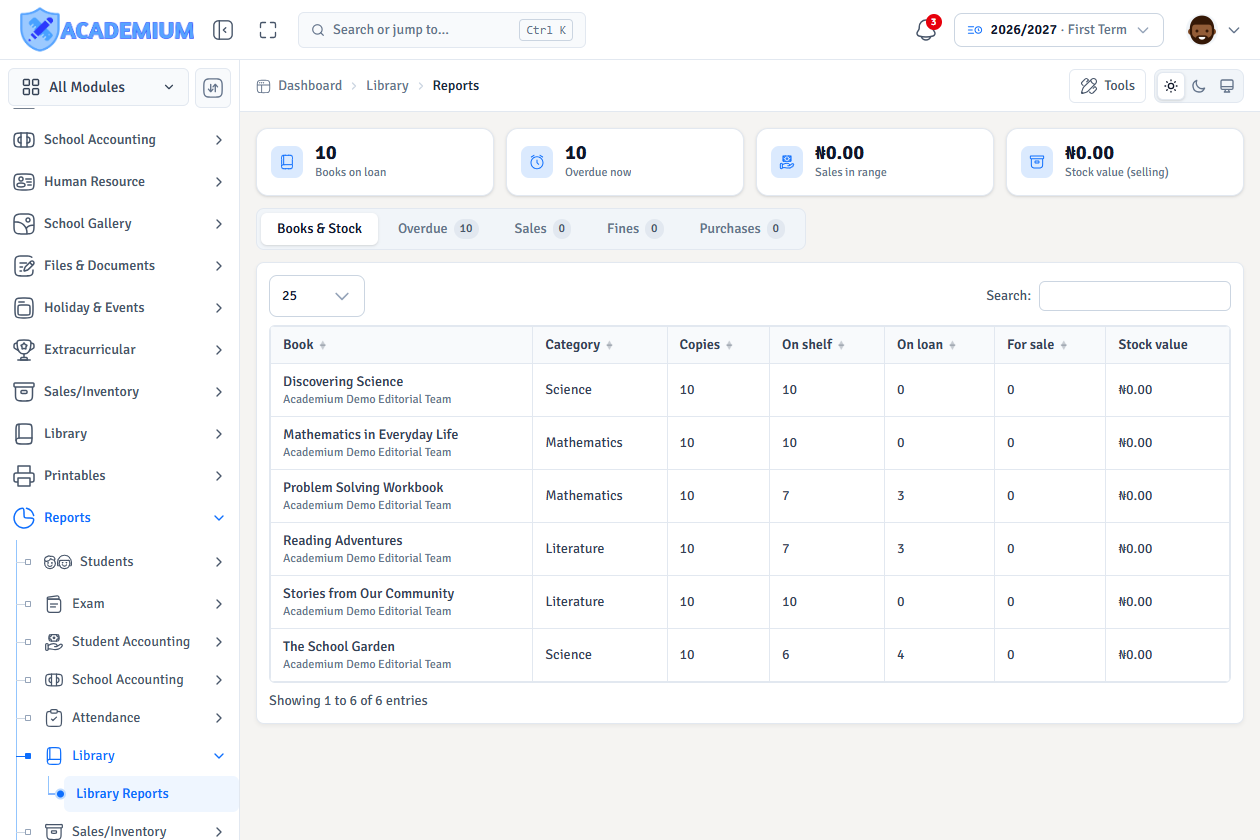
Choose the report
- Books & Stock: review the catalogue and available copies or sale quantities.
- Overdue: follow up books not returned by their due dates.
- Sales: review book bills, delivery and money owed.
- Fines: review library charges and their payment state.
- Purchases: follow supplier bills and books bought for the school.
Use the filters offered by the selected tab. Sales, fines and purchases have date-range filtering. Check the range before comparing totals or exporting a table.
Use the table's export controls when you need a copy for review. A filtered report is a view of existing records; it does not change a loan, bill, payment or stock quantity.
If figures look wrong
Check the branch and filters first. For sale stock, remember that creating an allocation does not hand over books: stock changes when the sale is marked Given. For purchases, receipt and payment are different steps. Open the underlying transaction before making a correction.
Report access depends on staff permissions. Ask an administrator if you can do library work but cannot open its reports.
Works with other parts of SMS
- Library reports also sit with the school’s other reports; see Reports overview.