Reviewing and correcting a student import
The import preview lets you inspect and correct a spreadsheet before creating student records. Open it from Students → Student Import after choosing a file. See Importing and exporting students for templates and saving.
Find the record you need
- Use All, With problems or Ready to choose the group you want to inspect.
- Search for a name, phone number, email or spreadsheet row. For a multi-class file, choose its sheet too.
- In With problems, use the problem field filter to focus on one type of correction.
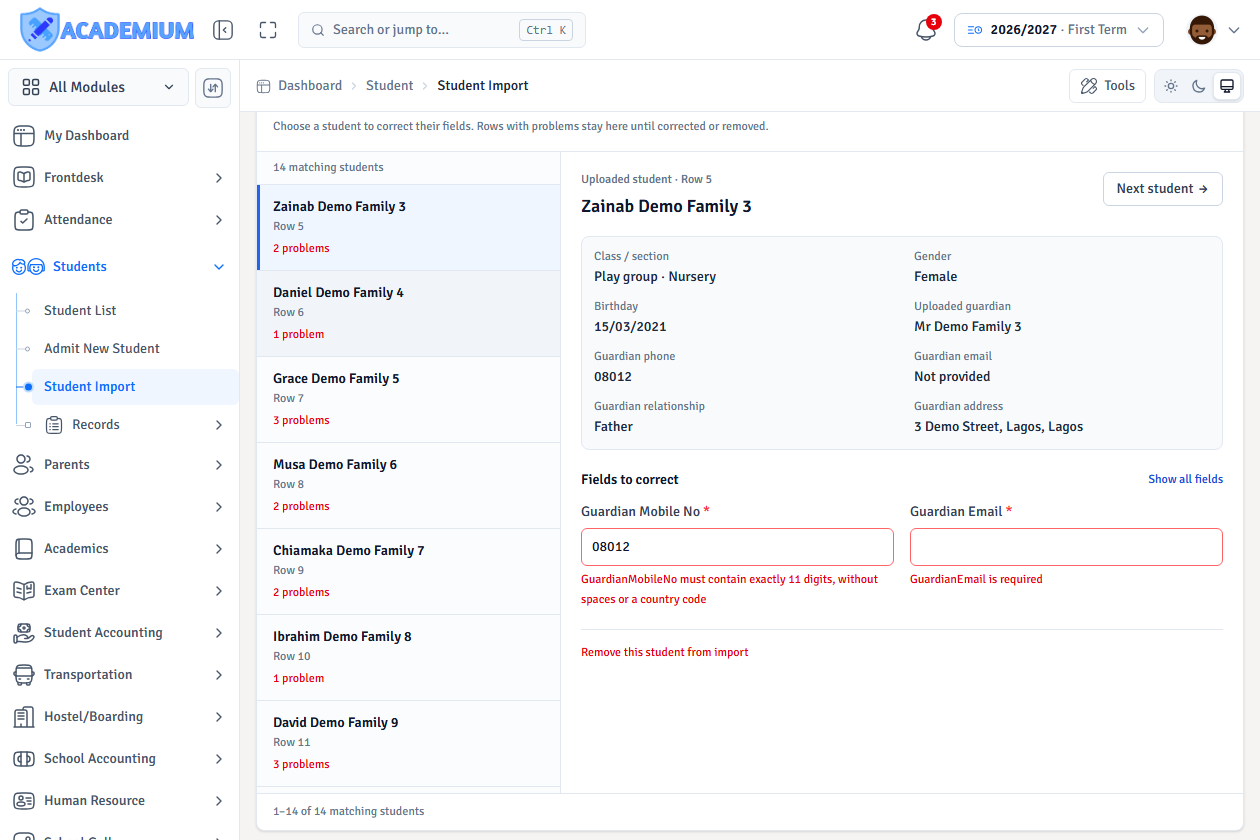
- Select a student to see the record and its field messages. The student name, class and source row help you match it to the file.
The student table has its own scrolling area. Scroll inside it vertically or horizontally without going to the bottom of the whole page.
Correct a student
Edit the fields shown for that student and follow the validation messages. Academium checks the record again and updates the ready/problem counts. A row that still has a problem stays available to correct.
Family recommendations have their own tab. They are suggestions, not errors; see Matching families during an import.
Remove a row from this import
Choose the row's remove action and read the confirmation before removing it. This removes the uploaded row from the pending import; it does not delete a student who is already in the school database.
Choose another file
Use Choose another file on the right of the page header to return to file selection. Finish or discard the current preview carefully: corrections made in the preview do not rewrite your original spreadsheet.
While the file is processing
You can open Preview while the sheet is still being read. Loading placeholders show the preview is not ready yet. Wait for the student rows and counts before deciding which students to import. Reading and reviewing a file do not commit it to the database.
Works with other parts of SMS
- Fields follow your student field settings; families can be matched as you review; see Matching families during import.