The Teacher's dashboard
The Teacher's dashboard is built around your teaching day.
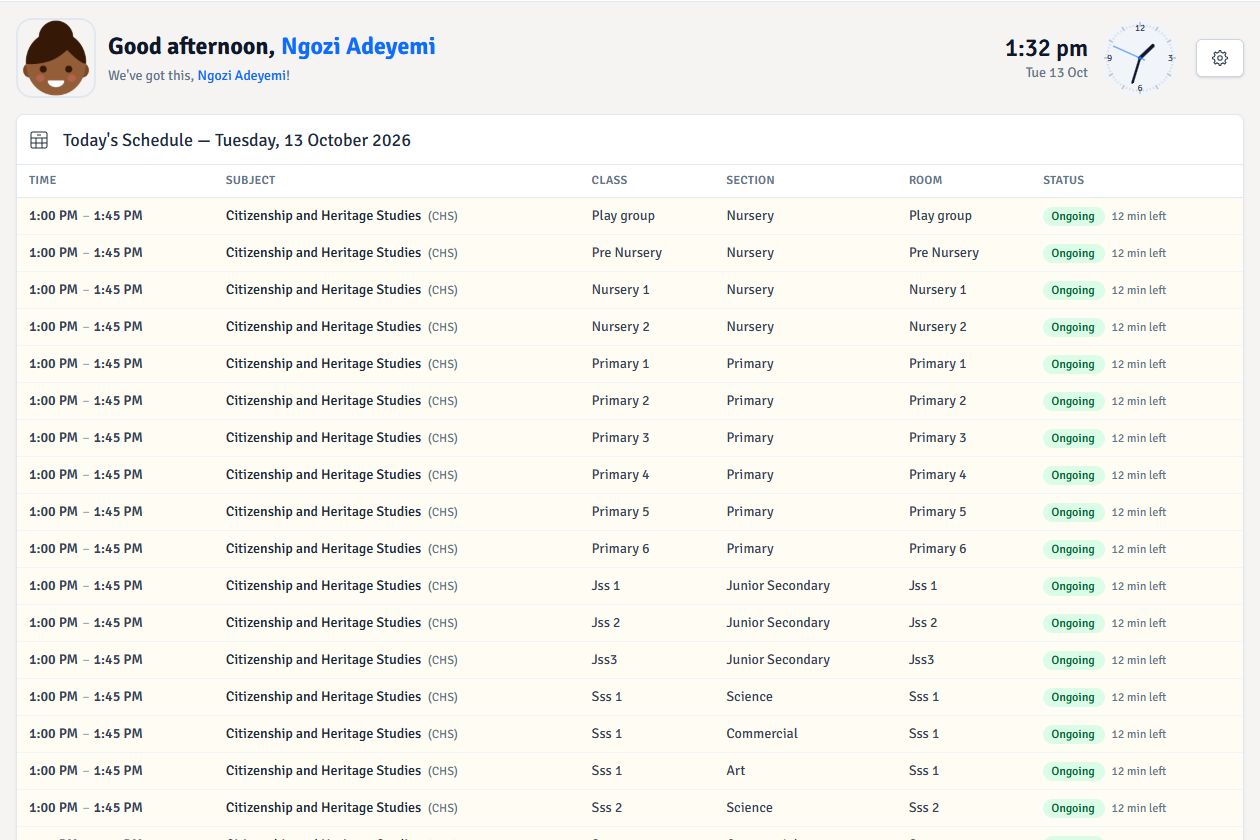
Today's Schedule
Your lessons for today, from your timetable, with the time, subject, class, section and room of each period.
- The lesson happening now shows as Ongoing, with the minutes left.
- Lessons still to come show as Upcoming, with how long until they start.
- Finished lessons move to Completed classes.
- When every period is over, it says so.
If it says No schedule available for today, you have no lessons today, or your class timetables have not been set up yet. Ask your school admin. See Class Timetable.
Catch Up
Catch Up is enabled by default and shows unfinished work your role can act on. It is hidden while loading or refreshing and when no items need to be shown. A saved preference to hide it is kept. See Catch Up.
Event Calendar
Upcoming holidays and events, as a list or a month.
Birthday Celebrants
Students and staff with a birthday today.
Arranging it
Choose your clock style and calendar view. See Arranging your dashboard.
Your whole week is under Academics → Teacher Timetable. See Teacher Timetable.
Works with other parts of SMS
- Teachers see their own timetable without choosing anything, and Catch Up shows registers they still need to take.