Arranging your dashboard
Open the dashboard settings to make the dashboard yours. Your choices are saved for you, in your role, at your branch, so they do not change anyone else's dashboard.
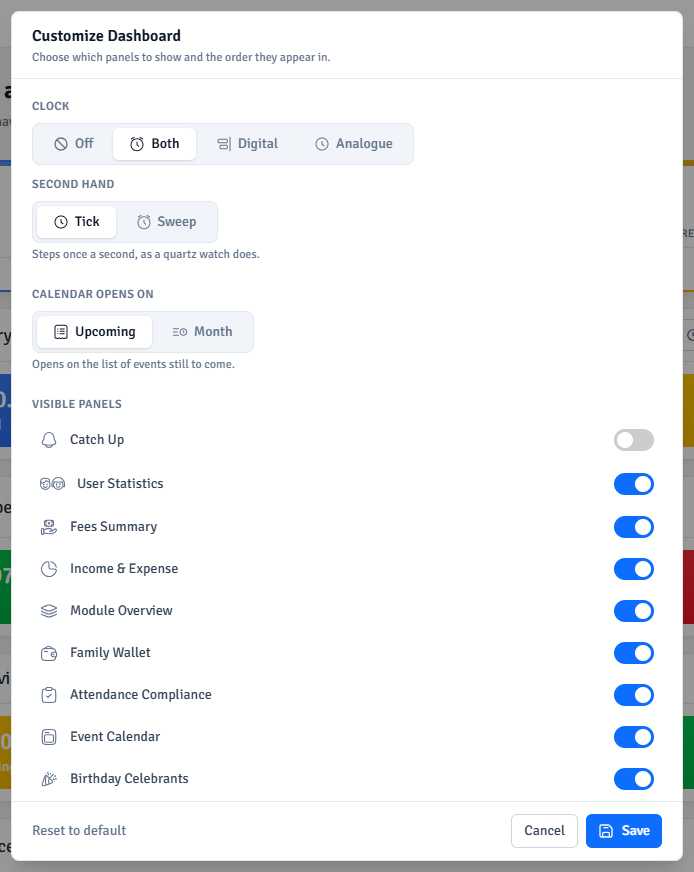
Panels
- Show or hide each available panel. Catch Up starts enabled; an existing saved choice is kept.
- Catch Up and Attendance Compliance may still be absent when enabled: they hide while refreshing and when they have no relevant content to display.
- Reorder the panels by dragging them. The calendar and birthdays keep their place.
Which panels you can choose from depends on your role's dashboard. See Your dashboard.
Clock
| Setting | Choices |
|---|---|
| Clock | Digital, analogue, both, or off |
| Second hand | Tick or sweep |
Calendar
Choose whether the event calendar opens as an Upcoming list or a Month.
Admissions (School Owner)
Choose the admissions scope or session/term filter offered by User Statistics. Check it before comparing recent-admission counts. Following a counter can open a filtered student list, rather than every enrolled student.
Works with other parts of SMS
- The panels you can show follow your permissions.