Dashboards for other roles
School Admins, Accountants, Receptionists and roles your school creates see a dashboard suited to their permissions.
What you can see
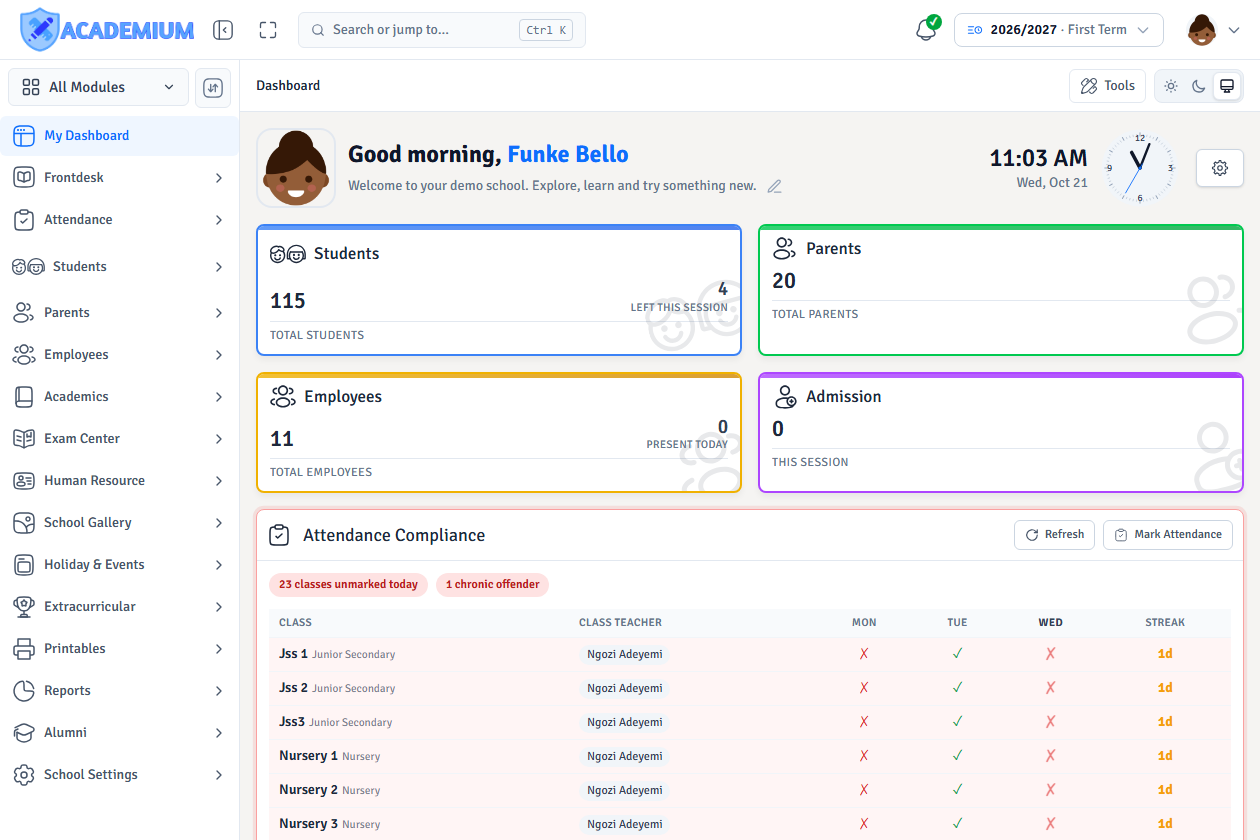
| Panel | What it shows |
|---|---|
| Catch Up | Unfinished work your role can act on |
| User Statistics | Student, parent, staff and admissions counts where supplied, including the School Admin dashboard |
| Attendance Compliance | Registers that have or have not been saved, on the School Admin dashboard when permitted |
| Event Calendar | Upcoming holidays and events |
| Today's Birthdays | Students and staff with a birthday today |
The greeting and optional clock appear above the panels. Available panels depend on your role, enabled modules and permissions. A custom role does not inherit the owner's financial dashboard.
Why a panel may be absent
Catch Up is enabled by default, but is hidden while loading or refreshing and when there are no items to show. Attendance Compliance is also hidden while loading, when there are no classes to report, on non-school days and between terms.
Check your panel preferences as well. A panel you previously hid stays hidden until you enable it.
Follow up and arrange your dashboard
Open a Catch Up action to go to the relevant work. School Admins can use Attendance Compliance to follow up on missing registers.
Use dashboard settings to show or hide available panels and choose the clock and calendar view. See Arranging your dashboard.
Works with other parts of SMS
- What each role sees follows its permissions.