Employee attendance
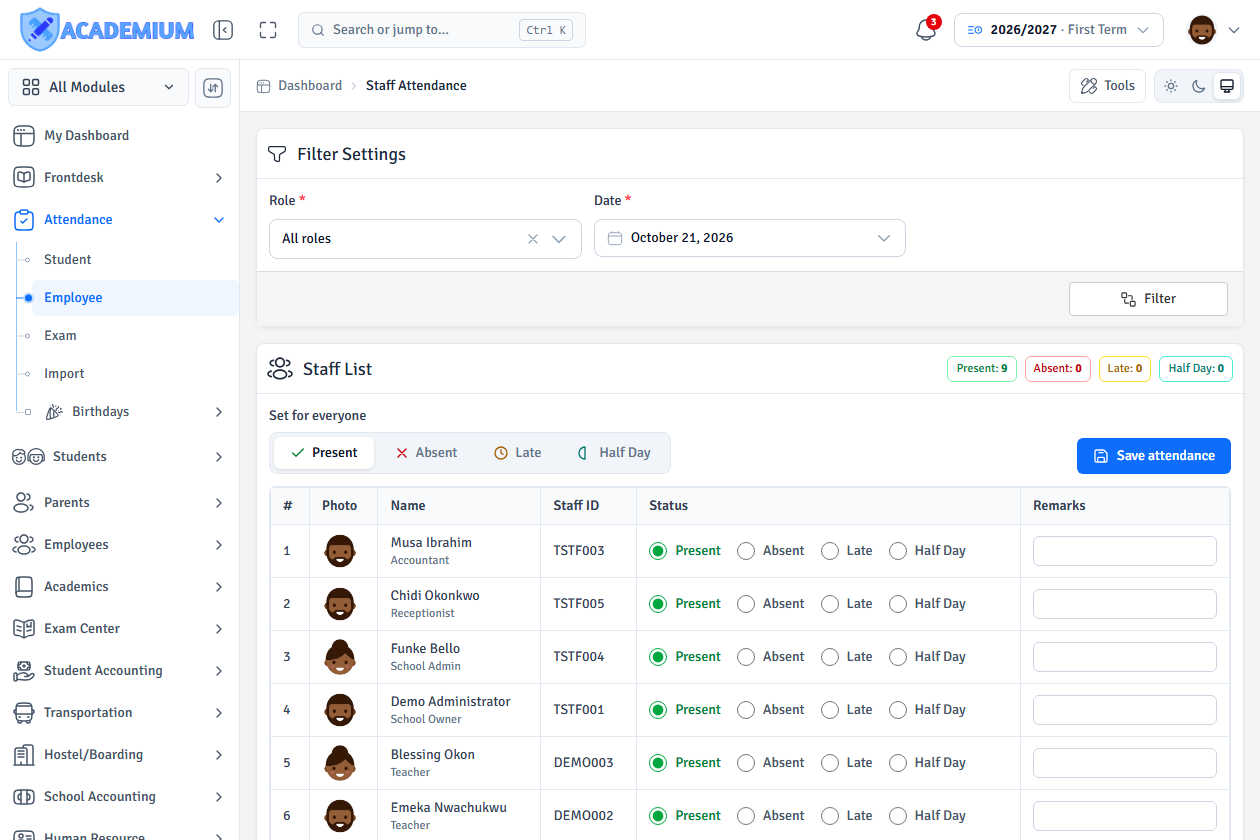
Take the staff register from Attendance → Employee. Your role needs staff-attendance permission.
- Choose a role, or all roles, and the date.
- In a new register, Present is selected automatically for staff without saved attendance.
- Use the Set for everyone tabs to apply a mark to the whole loaded register, then change any exceptions. Available marks are Present, Absent, Late and Half day where offered.
- Add remarks if needed, check the totals and choose Save.
Nothing is saved just by opening the page. Existing saved marks are preserved. A register with different marks may have no bulk tab selected; selecting one replaces everyone's mark in the draft.
Correcting attendance
A saved register opens locked. Choose Edit, make the corrections, then choose Update attendance. Read-only users cannot change marks.
Good to know
- Staff attendance is not tied to a term, so it can be taken on a working day outside term dates.
- It is not shown on student report cards.
- Student, staff and exam registers have separate permissions.
- Find staff attendance reports under Reports → Attendance. See Attendance reports.
Works with other parts of SMS
- Staff registers list the employees from your staff records, and appear in attendance reports.
- Holidays close the register on those days.