Exam Setup
An exam is made up of components such as 1st C.A. and Exam. Set those up first under Mark Distribution.
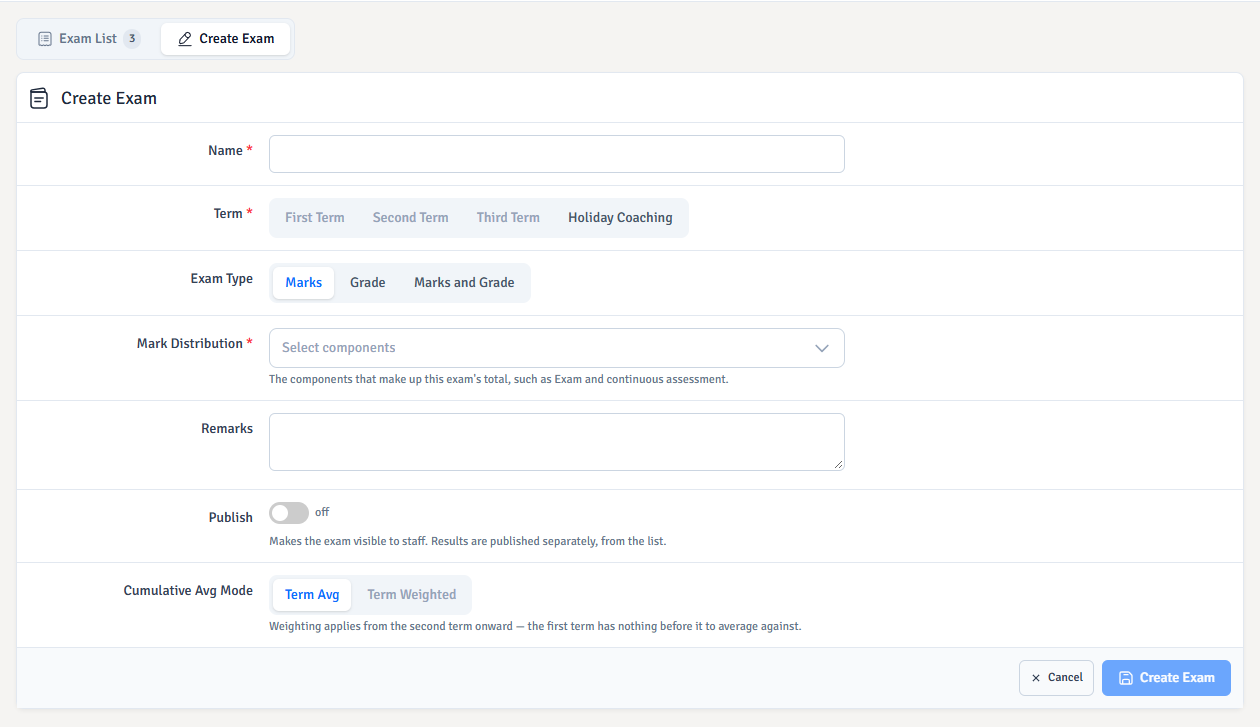
Creating the term's exam
Open Exam Center → Exam → Exam Setup and choose Add Exam.
- Name the exam, for example First Term Examination.
- Choose the term. Each term can only have one exam.
- Choose the exam type:
- Marks: scores out of the full mark;
- Grade: grades only;
- Marks and Grade: both.
- Under Mark Distribution, tick the components that make up this exam's total, and give each a full mark and a pass mark.
- Choose the cumulative average mode, which decides how this exam combines with earlier terms on a cumulative report:
- Term average: a simple average of the terms;
- Term weighted: each term counts for a percentage you set. The weights must add up to 100%. Weighting applies from the second term, and needs an exam in every earlier term.
- Save.
Publishing the exam to staff
Turn on Publish to make the exam visible to staff, so teachers can start entering marks.
Publishing results
When the results are final, open Exam Center → Publish Results. Choose the exam and report-card templates, then follow preparation and upload to the online results page. This has replaced the old result-release toggle. Online publishing depends on the enabled module, subscription and staff permissions.
Publishing locks the exam's results. Unpublish before changing marks, positions or comments, then publish the corrected copy. See Publishing results online.
Publish results only after they have been checked and authorised. See Positions, comments and authorising results.
Deleting an exam
Deleting an exam also removes its schedule, marks and results, and cannot be undone.
Common issues
"An exam already exists for this term." Each term has one exam. Edit the existing one instead.
"Term weighted needs an exam in every earlier term." Create the earlier terms' exams first, or use Term average.
With Academium Surepass
The exam and components you set up here are what Academium Surepass fills when it sends CBT scores to SMS. Each component becomes an assessment type in Surepass. Set the exam up for the term before sending Surepass results. See Sending results to Academium SMS.
Works with other parts of SMS
- Each exam is built from your mark distribution, which Surepass also uses for its assessment types.
- Catch Up reminds you of results that were never published.