Parents and guardians
A parent record brings a family together. Every child linked to the same parent is treated as a sibling, so the family can be billed, paid for and followed up together.
Adding a parent
Parents are usually created when you admit their first child. You can also add one directly from Parents → Add New Parent.
- Enter the family name and guardian relation, then complete the required contact details.
- Check for an existing family before adding another record. The current forms use the shared guardian fields rather than separate father and mother entry fields.
- Fill in any custom fields your school uses for parents.
The parent list
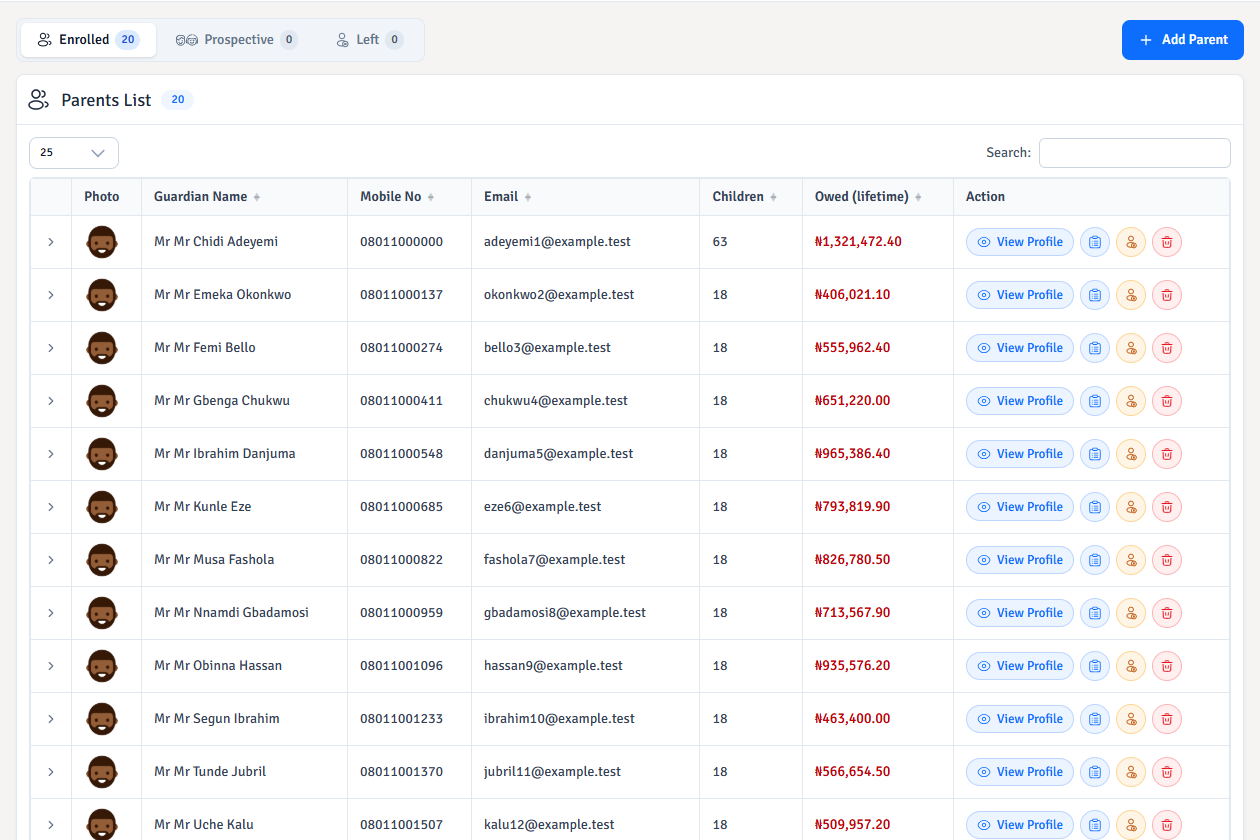
Parents → Parents List has tabs for Enrolled, Prospective and Left families, each with a count. A family's status comes from their children.
The list can show:
- the total the family owes (hidden unless your role can see fees);
- any custom fields you chose to show as columns.
From a family's row you can open the family invoice, to see and collect everything the family owes in one place. See Collecting payment for a whole family.
The parent profile
The profile has two tabs: details, and children, with a count of the children. Each child shows their status: enrolled, not enrolled this session, prospective, left, transferred or graduated.
Move a child to another parent
Use Change parent from the child's student-list actions or profile. Search for an existing parent at the same school, inspect their details and children, then save and confirm. The student keeps their academic and financial records; earlier payments remain attributed to the parent who made them. See Changing a student's parent.
During spreadsheet import, Family recommendations lets you compare a proposed family before the student is saved. Recommendations are optional and include name, phone and email comparisons where available.
When a whole family leaves
From the parent list, mark the family as left. Every child still at the school is marked as left together. Academium shows each child's unpaid balance first, including earlier sessions, and writes it off when you confirm.
Removing a parent
Do not delete a family to correct a child's parent link. Use Change parent instead. Students with any school history, including fees, exams or attendance, cannot be deleted. Parent removal also respects linked children and retained history; follow the reason shown if deletion is refused.
Works with other parts of SMS
- The parent record decides who pays for whom: family fee collection and the family wallet use the children linked here.
- The email address here is how the school mailbox recognises the parent, and how they sign in to the parent portal.
- The phone number here is used for WhatsApp messages.