Discounts and removed fees
Every family is different. From a student's invoice (Invoices / Fees Payment), you can adjust their bill without losing sight of the original charges.
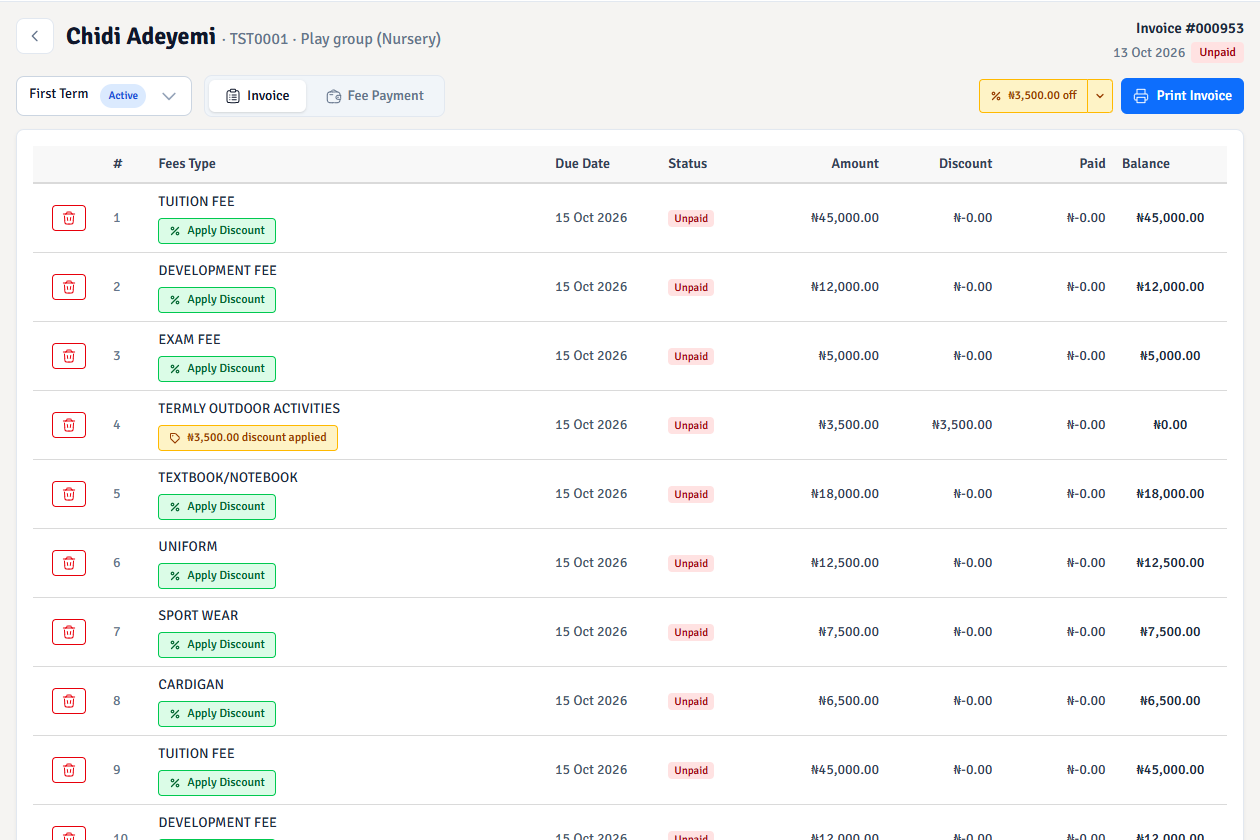
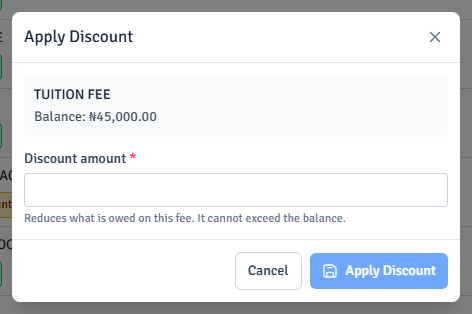
A discount on one fee
On the student's invoice, apply a discount to a single fee line. To undo it, choose Remove discount. The full amount falls due again.
A discount on the whole invoice
Choose Apply discount to invoice to spread a discount across the outstanding fees. Academium shows the balance first. The discount is shared out in the same way as a part payment.
Discounts can also come from scholarships.
Removing a fee from one student
Remove a fee line that does not apply to a particular child, for example textbooks they already have. It moves to the Removed fees tab, where you can restore it.
To take a student off transport or hostel for the term, unassign it from the invoice. You cannot unassign one that has been paid.
Writing off fees
When a student leaves, their unpaid fees are written off. See When a student leaves. If your school uses approval rules, write-offs wait for approval.
Reports
The fee adjustments report lists discounts, scholarships and write-offs. See Fee reports.
Works with other parts of SMS
- Approved scholarships also become discounts; write-offs can wait for approval rules.
- Discounts, scholarships and write-offs appear together in fee reports.