Promoting students at the end of the session
At the end of each session, promotion moves students into their next class for the new session. Every outcome is chosen by your staff; Academium never promotes anyone automatically. Open Academics → Student Promotion.
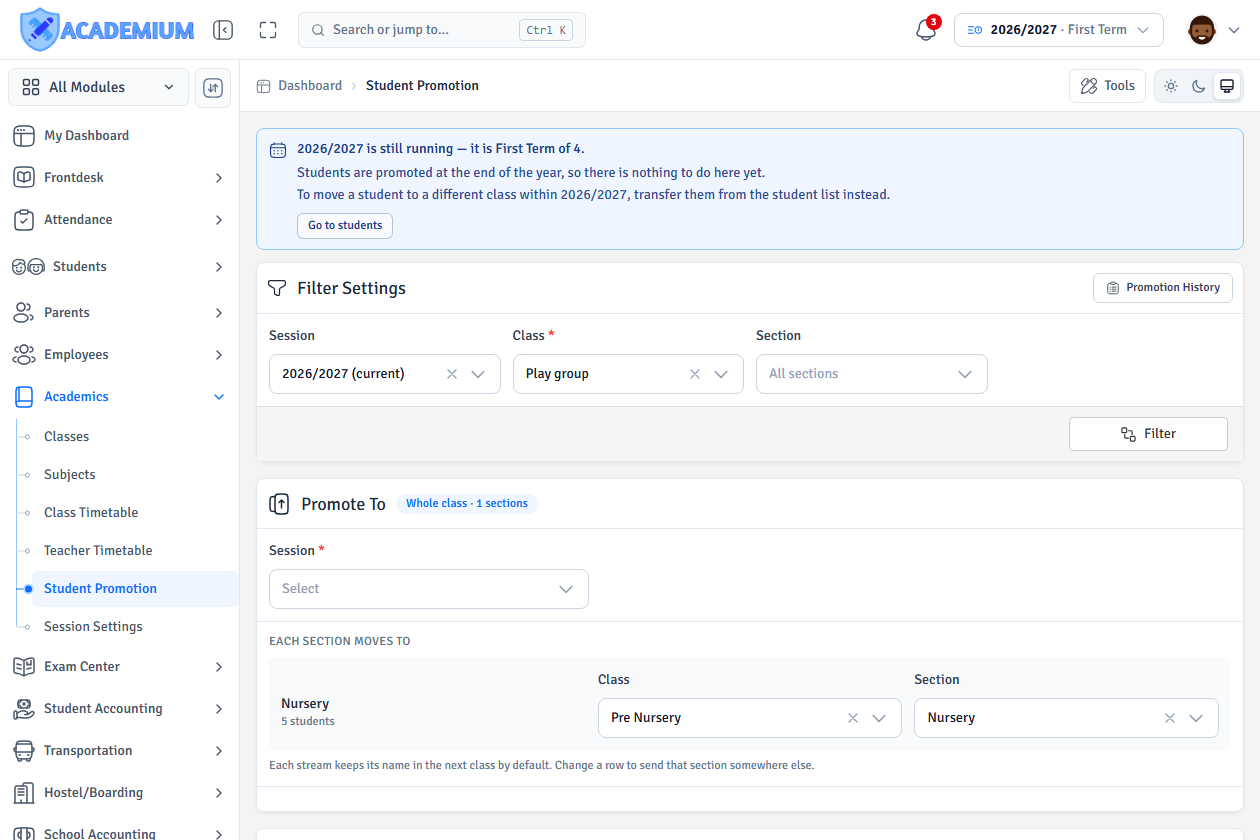
Creating or activating the next session, importing new students and syncing devices do not decide promotion outcomes. Existing students need an explicit promotion, repeat, graduation or leaving decision. A new import uses the selected workspace session; check the year picker before preparing it.
Before you start
- Create the next session. See Sessions and terms.
- Check your class order. Academium suggests each class's next class from it. See Classes and sections.
Promoting a class
- Choose the source session, then the class or a single section. Leave section blank to load the whole class. You can finish a previous year here without changing the year picker for the rest of the workspace.
- Choose the destination session and check each section's destination. The next class is suggested from the class order; you can change it.
- For each student, choose an outcome:
- Promote: moves to the next class.
- Repeat: stays in the same class for the new session.
- Graduate: finishes at the school and joins the alumni.
- Left: leaves the school.
- Select several students and use Set for N selected to give them all the same outcome. Searching only filters what you see; it does not change your choices.
- Confirm.
If the destination class already has students in the new session, Academium tells you before promoting. Merging into it is allowed. Recently promoted enrolments can be excluded from the initial list to prevent repeat work; check the option to include them when investigating a missing student.
Search only changes the visible rows. Selected students hidden by the search still belong to the selected batch. Review the count and outcomes before confirming.
Students already promoted out of that source class are listed as Already Promoted, with their destination. Reverse the earlier promotion if they need to move again; do not run a second promotion over the same enrolment.
Fees and promotion
- Unpaid balances carry forward into the new session.
- A student who owes fees cannot graduate. They are listed separately so you can follow up. If you decide to write off their balance, Academium shows the amount before you confirm.
- Students marked Left have their unpaid fees written off. The total is shown, and you give one date and reason for the whole run.
Undoing a promotion
Promotion History lists each run, grouped by class. Reversing a run removes the new enrolments, the alumni status and any fees carried forward. Enrolments that have already been used, for example with marks or payments, are skipped, and Academium tells you which.
Common issues
I cannot pick the session I want to promote into. You can only promote into a session that comes after the source session, and is not locked or finished.
A student is listed under "owing finalists". They owe fees, so they cannot graduate yet. Collect the balance, or write it off, then graduate them.
Works with other parts of SMS
- Unpaid fees follow promoted and repeating students into the new session; graduating can be held back until fees are settled.
- Graduates join the alumni list.
- A graduate’s remaining pocket money returns to the family wallet.